
Luxer One
Luxer OneLifestyle
3.11.72K Reviews
- Version
- 6.0.15
- Installs
- 500.00K
- Age Rating
- Everyone
Screenshots

Our Review of Luxer One
 Analysis by Appyee
Receiving a delivery should be simple, but the last few steps can become awkward when a parcel is placed in a shared building locker. Luxer One is a free lifestyle app from Luxer One that connects the phone experience with package pickup. I looked at it less as a flashy shopping tool and more as a practical access layer between a delivery notification and the locker itself. That distinction matters: its value depends heavily on whether your building uses Luxer One lockers and how comfortable you are managing a pickup from a phone.
My overall impression is mixed but useful. When the system is already installed where you live, the app can reduce the uncertainty of finding and collecting a parcel. It is especially helpful for people who dislike crowded package rooms, have difficulty carrying deliveries from a distant desk, or need to plan a pickup around work, caregiving, or mobility limitations. At the same time, the experience is not equally convenient for everyone. A phone-based workflow can introduce its own obstacles, and the app cannot solve physical problems created by the locker location, lighting, reach, noise, or building layout.
How Luxer One feels in everyday use
I find Luxer One easiest to judge as a bridge between knowing a parcel is ready and actually collecting it: its usefulness depends on how smoothly that handoff fits your building and your routine. In this section, I’ll focus on what that phone-based role changes in everyday use, then turn to the practical choices that make a pickup less stressful.
Readability and navigation before pickup
The first thing I noticed is that this is a focused utility rather than a broad delivery-management app. You are not opening it to compare shipping services or organize every order from every retailer. The useful moment comes when a package is associated with a Luxer One locker and you need to understand what to do next. That narrower purpose keeps the idea easy to grasp, although the usefulness of each screen depends on the information connected to your building and delivery.
For someone who is comfortable with smartphones, the basic mental model is straightforward: identify the package, go to the locker area, and use the app as part of the pickup process. That is easier to understand than searching through a large package room or asking a front desk employee to locate a parcel. I also appreciate that the app’s role is concrete. It is not trying to replace a shopping app, a courier app, and a building-management system all at once.
Readability is more than large text, however. A person with low vision may need strong visual hierarchy, clear status information, and enough time to interpret instructions while standing in a busy lobby. The app’s practical success therefore depends on whether the important action is obvious and whether the user can comfortably read the phone in the actual pickup environment. I would not treat the presence of a simple workflow as proof that every screen will work equally well for every reader.
One useful habit is to review the package information before walking to the locker. I would check the phone while seated, at home, and make sure I understand which delivery I am collecting. This avoids trying to decipher a notification in a hallway with people moving around, poor lighting, or a queue behind me. It is a small change, but it turns the app from something I react to at the locker into something I use to prepare.
The current version is 6.0.15, and the app requires iOS or Android 12 or later. That requirement is important for households with an older phone, a spare device, or a device used by a relative who does not upgrade often. A person may be perfectly capable of using the locker but still be blocked before starting because the available phone cannot run the app. Checking the operating system first is one of the most practical steps before relying on it.
Motor and sensory considerations at the locker
The phone interaction is only half of the experience. The user still has to approach the locker, position the device, read what is happening, and retrieve the parcel. For someone with limited hand strength or reduced dexterity, the advantage of a guided pickup may be offset by the need to handle a phone and then pull a package from a compartment. The app can make the process more organized, but it does not remove the physical demands of the locker itself.
This is where expectations should stay realistic. A person using a wheelchair, walker, cane, or mobility scooter may find the app helpful because it can reduce time spent searching for a package. Yet the locker’s height, the turning space in front of it, the weight of the parcel, and the route through the building may matter more than the software. I would treat the app as one part of an accessible pickup plan, not as a guarantee that the whole installation is easy to use.
Users with hearing loss may prefer a process that does not depend on spoken instructions, while users with light sensitivity or visual processing difficulties may need to avoid a harsh or crowded lobby. A deaf or hard-of-hearing person can still benefit from a phone-centered workflow if the key information is presented visually, but the surrounding environment may create separate problems. Likewise, someone with sensory sensitivities may find a quiet, pre-planned pickup better than waiting in a busy reception area.
For motor limitations, preparation is especially valuable. I would keep the phone charged, avoid carrying several bags during the pickup, and choose a time when the entrance is less crowded if that is possible. If another person is helping, it is worth deciding in advance who will hold the phone and who will carry the parcel. That simple division can prevent a frustrating handoff at the locker.
There is also a privacy angle. A person may need assistance without wanting to hand over complete control of their phone. If a trusted helper is involved, the user should stay aware of which screen is being shown and which package is being collected. The app is designed around a personal device, so shared-device habits can become confusing when several household members receive deliveries.
Situational access for real households
The strongest use case I found is the resident who receives deliveries while away from home and wants a more predictable return. Imagine coming back after work with groceries, a child in tow, or limited energy for a long search through a package room. A locker-based pickup can make the final step more contained: open the app, identify the parcel, go to the designated area, and leave with the correct package. That is not dramatic, but it can remove a surprisingly tiring part of the day.
It may also help people who do not want to interact with a staffed desk. Someone with social anxiety, speech difficulties, or a language barrier may prefer a process that relies less on explaining a delivery to another person. The benefit is situational rather than universal. If the building still requires assistance for a particular parcel or if the locker area is difficult to reach, the app cannot eliminate every human interaction.
For older adults, I would recommend testing the complete journey with a trusted person before depending on it for an important delivery. The question is not simply whether the app can be installed. Can the user recognize the relevant package, understand the next step, operate the phone while standing, and carry the parcel safely? Practising once in a calm situation can reveal whether the real barrier is digital, physical, or environmental.
Families can use a similar approach. If several people receive parcels at one address, agreeing on a simple routine helps avoid collecting the wrong item. I would identify the package before leaving the apartment, keep the phone in an accessible pocket rather than buried in a bag, and avoid combining the pickup with a task that already occupies both hands. These are ordinary adjustments, but they matter more than a polished notification when someone is managing children, mobility equipment, or a visual impairment.
The app is less compelling for people whose deliveries rarely go to Luxer One lockers. In that situation, a retailer’s order page or a courier’s tracking app may be more useful because those tools cover the journey before the package reaches the building. Luxer One is not a universal replacement for those services. It becomes worthwhile when the locker is a regular part of your residential routine.
Where the experience still creates barriers
The biggest limitation is dependence on the surrounding installation. A well-designed phone workflow cannot make an inaccessible locker accessible. If the locker is placed behind a heavy door, down a narrow corridor, at an uncomfortable height, or in a noisy area, the resident may still need building assistance. This is particularly important for disabled users: software convenience should not be mistaken for physical inclusion.
There is also a risk in treating the phone as the only practical route. A resident may have a device that meets the operating-system requirement but still struggle with battery life, screen glare, touch accuracy, vision, memory, or the stress of completing a task in public. Someone borrowing a phone may not have the same account context or confidence. Before choosing this as a primary delivery routine, I would consider whether there is a reliable backup arrangement with the building or a trusted helper.
Another trade-off is attention. The app may simplify the pickup, but the user still has to pay attention to package identity and the physical surroundings. That can be difficult for someone who is distracted by children, pain, fatigue, or sensory overload. I would avoid opening the app for the first time while standing directly in front of the locker. Learning the sequence at home is safer and usually faster.
The public rating sits at about 3.1 from roughly 4,500 ratings, with around 1,700 written reviews. I read that as a reason to keep expectations measured rather than as a final verdict. A locker app can feel excellent when the building setup is smooth and frustrating when the notification, phone, locker, or access route fails to line up. Ratings for this kind of tool often reflect the entire delivery chain, not just the interface, so the local experience matters enormously.
Privacy and trust also deserve ordinary, practical attention. I would install the app only on a device I control, keep the phone protected with its normal security settings, and avoid leaving package details visible on a shared screen. These are not special Luxer One tricks; they are sensible habits whenever a phone is used to manage deliveries. They become more important when several people share an address or when a helper handles pickups.
How it compares with familiar alternatives
A traditional package room can be more flexible because a staff member may help locate a parcel, carry it, or explain a problem. Its weakness is that it may involve waiting, conversation, limited opening hours, or a room that is difficult to navigate. Luxer One’s advantage is the possibility of a more self-directed pickup, while the staffed alternative may be better for someone who needs physical assistance or prefers not to operate a phone.
A courier’s own app is better for tracking a parcel while it is still in transit. It may provide broader delivery information, but it does not necessarily make the final locker interaction easier. A retailer’s order page is useful for purchase history and shipment details, yet it is usually not the tool I would choose when standing at a Luxer One locker. In that specific moment, the locker-focused app has a clearer job.
Home delivery remains the simplest choice for some people, especially those who cannot reach a shared locker safely. It can also be preferable for large or heavy items. On the other hand, a locker may offer more control for residents who are often away, live in a building with unattended entrances, or want parcels kept in one designated place. The right choice depends less on which option sounds modern and more on which final step the user can complete comfortably.
Who should use it and how I would start
I would recommend trying Luxer One if your building already relies on its lockers, you receive packages regularly, and you prefer a self-service pickup over searching a room or speaking with a desk. It is also worth considering if predictable package organization helps you manage fatigue, anxiety, work schedules, or family responsibilities. The app is free, and its content rating is Everyone, so the basic barrier is not age or purchase cost.
I would be more cautious if you use an older phone, have unreliable access to a charged device, or need someone else to handle most of the physical pickup. In those cases, the app may still be useful as an information tool, but it should not be your only plan. I would first confirm that the building’s locker location is reachable and that a helper can participate when necessary.
My preferred setup is simple: install it before an important delivery arrives, open it at home, learn where package information appears, and then make one low-pressure pickup. I would also note the route from the apartment to the locker, including doors, lifts, lighting, and places where a mobility aid might need extra space. That test tells you much more than downloading the app and assuming the experience will be effortless.
Luxer One is a practical lifestyle app with a narrow but meaningful purpose. It can make a locker pickup feel more organized and independent, especially when the building environment is already convenient. Its accessibility story is more complicated: the phone workflow may support different needs, but the physical locker, the operating-system requirement, and the pressure of using a device in a shared space remain real considerations.
After its release on October 2, 2019, the app has reached over 500,000 installs, which suggests that the locker model is familiar to a substantial group of residents. Still, popularity does not remove the need to test the specific building setup. My inclusive verdict is that Luxer One is worth trying when it complements a reachable locker and a dependable pickup routine, but it is not a substitute for accessible building design or human help when those are needed.
Verdict
Strengths of Luxer One
- Convenient mobile access to package lockers and delivery notifications.
- Supports multiple properties and locations from one account.
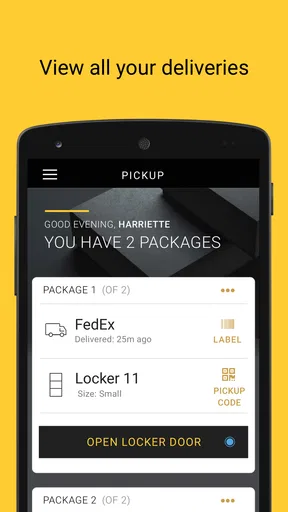
- Pickup codes and locker details are easy to find in the app.
- Reduces missed deliveries and packages left unattended.
- Useful delivery history helps track previously collected parcels.
Limitations of Luxer One
- Requires participating Luxer One lockers at your building or delivery location.
- App usefulness depends on reliable internet and notification permissions.
- Some users may find repeated delivery alerts excessive.
- Locker availability can be limited during busy delivery periods.
- Account or access issues may require assistance from property management.
Similar Picks in This Category
View All
SmartThings
Samsung Electronics Co., Ltd.4.6

Google Home
Google LLC4.0

Pinterest4.2

Astrotalk - Talk to Astrologer
Astrology & Horoscope4.7

My Verizon
Verizon Consumer Group4.5

Samsung Wallet (Samsung Pay)
Samsung Electronics Co., Ltd.4.1
Frequently Asked Questions
What is Luxer One, and what can I use it for?
Luxer One is a package-management service designed for residents, employees, and property managers. Depending on the building or workplace setup, it lets you receive delivery notifications, view package details, access lockers, and retrieve parcels using the app or an assigned access method. Availability and features can vary by property, so your building must support Luxer One before you can use it.
How do I access a package stored in a Luxer One locker?
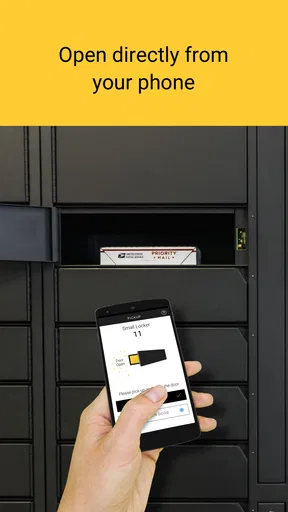
After a delivery is registered, Luxer One generally sends a notification containing instructions, such as a pickup code, barcode, or in-app access option. At the locker, follow the on-screen directions and enter or scan the requested information. Some locations may require Bluetooth, location access, or an account login. If the compartment does not open, contact your property manager or Luxer One support.
Does Luxer One charge users for receiving or picking up packages?
The cost depends on the policies established by your apartment community, workplace, carrier arrangement, or property manager. Some locations include locker access as part of their services, while others may apply fees for overdue packages, oversized deliveries, returns, or special handling. Review the notification and your property’s package policy before assuming every pickup is free.
What should I do if I do not receive a Luxer One delivery notification?
First, confirm that the carrier marked the package as delivered and that your phone number or email address is correctly registered with the property. Check spam folders, app notifications, and the Luxer One account for updates. Delivery scans can sometimes be delayed. If the package still cannot be located, contact the property’s package room or management office, since they may need to correct your resident information.
Is Luxer One safe, and what permissions does the app require?
Luxer One uses account information and delivery details to identify packages and provide access to lockers or package rooms. Depending on the features enabled at your location, the app may request notifications, camera access for scanning, Bluetooth, or location permissions. These permissions support specific functions, but you can review or change them in your device settings. Use a strong password and keep the app updated.
